The account is set up, the workflow fires, and the text shows "failed." More often than not the workflow is fine and the number simply isn't registered with the carriers yet.
Quick answer: In GoHighLevel, go to Settings > Phone System > Trust Center and click Start Registration under A2P Messaging. Enter your legal business name exactly as it appears on your tax documents, your government registered address, a contact person with an email at your own domain, your messaging volume and use case, and a live website with the HighLevel chat widget installed. Submit, then check the status in Trust Center.
Who needs A2P registration?
Anyone texting US numbers from a standard local number. HighLevel's A2P docs are clear on that one.
Canada is where people get confused. Per HighLevel's Canadian 10DLC policy:
- Canadian numbers texting the US need A2P, new or old.
- Canadian numbers bought before March 26, 2025 can text other Canadians without registering.
- Canadian numbers bought on or after March 26, 2025 need either A2P registration or Persona identity verification, even to text Canadians.
If there's any chance your contact list has American numbers in it, register. A text to a US contact from an unregistered Canadian number fails, and you usually find out from a customer.
How do you register for A2P in GoHighLevel?
1. Open Trust Center
Settings, then Phone System, then the Trust Center tab. Under A2P Messaging, click Start Registration. Two quick questions come first: where the business is registered, and whether it has a tax ID.
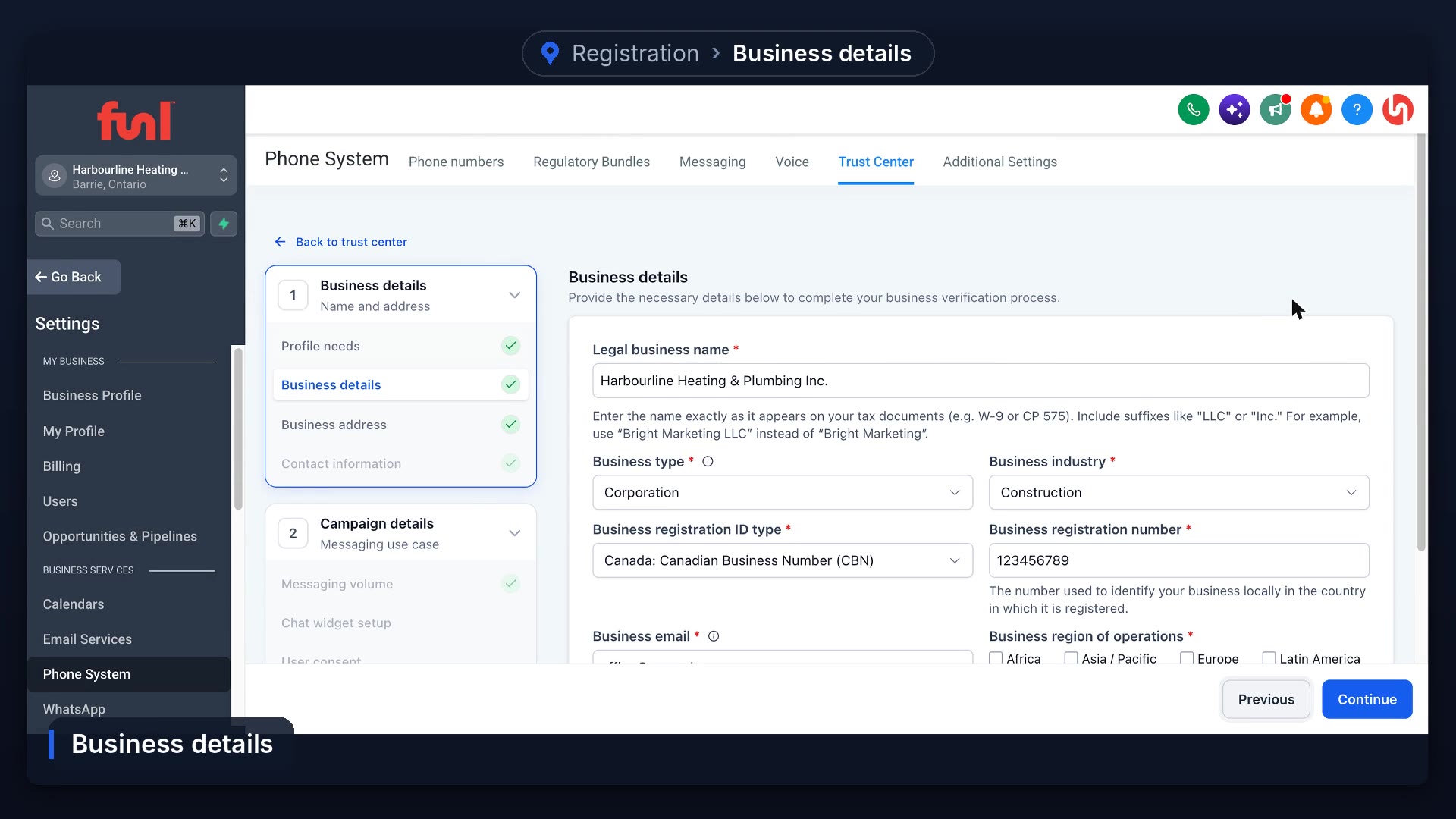
2. Business details
Type your legal business name exactly as it appears on your tax documents. Not your trade name, and not with "Inc." added or dropped. Then pick your business type and industry. In Canada, the registration number is the nine digit business number from the CRA.
3. Address and contact person
Use the address the government has on file. The contact person is someone the carriers can reach with questions. Give them an email at your own business domain, because Gmail or Yahoo addresses can slow approval. Click Send OTP, enter the six digit code from that inbox, and click Verify.
4. Volume and use case
Most small businesses pick low volume. The one time and monthly fees are listed right on each option. For the use case, Mixed covers both replies to customers and the occasional promotion.
5. Website and chat widget
Enter your website address. It has to be a real, live site, and the form won't let you continue if it can't reach it. Then copy the chat widget code and add it to your site.
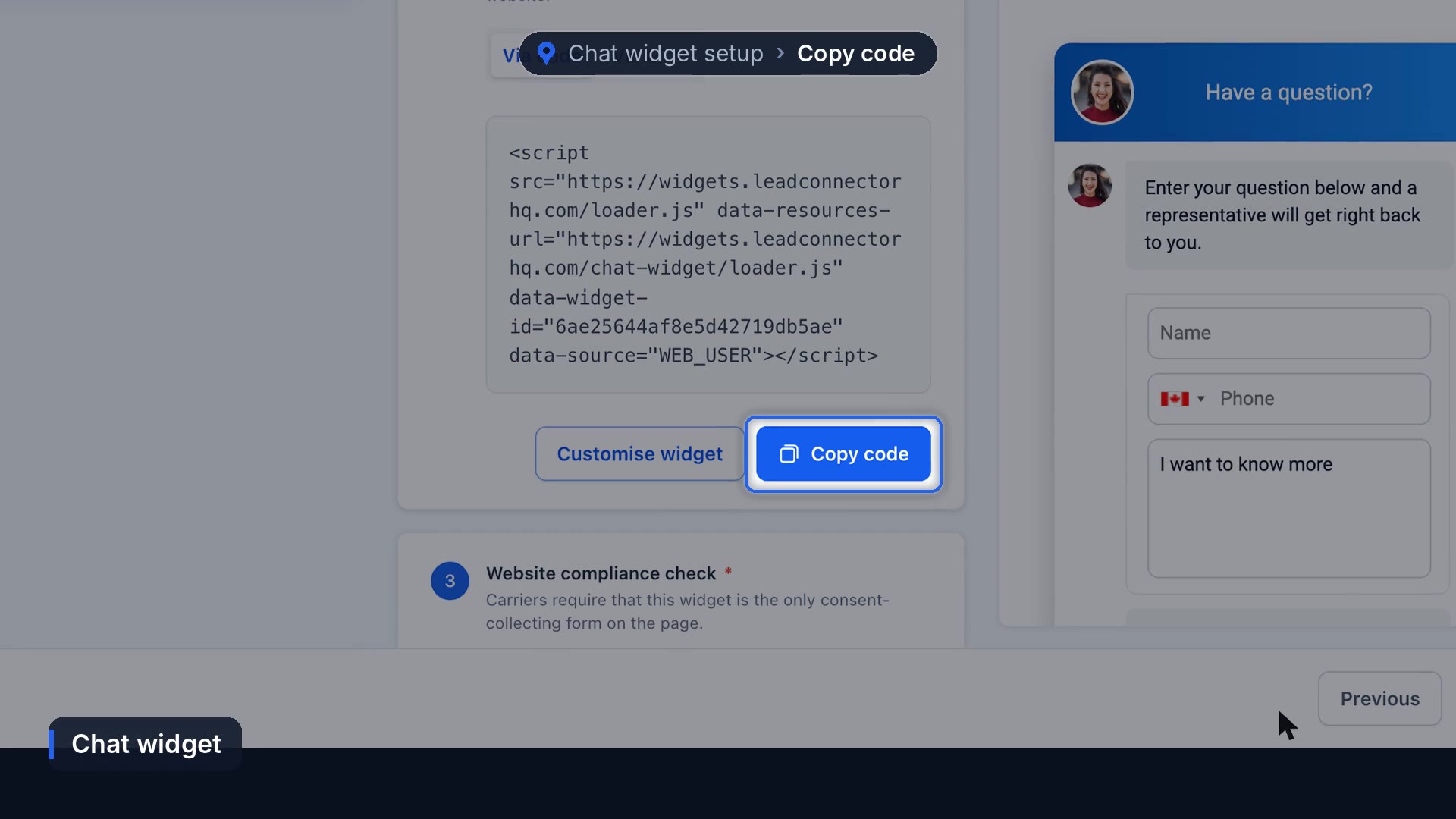
Carriers want the widget to be the only thing on that page collecting phone numbers. If your contact form also asks for a phone number on the same page, move one of them.
6. User consent and compliance checklist
The consent descriptions and sample messages fill in with your business name. Read them and edit anything that doesn't match what you'll actually send. Then the checklist: only tick a box if it's true. Live site, privacy policy and terms, your address, email and phone on the site, widget installed.
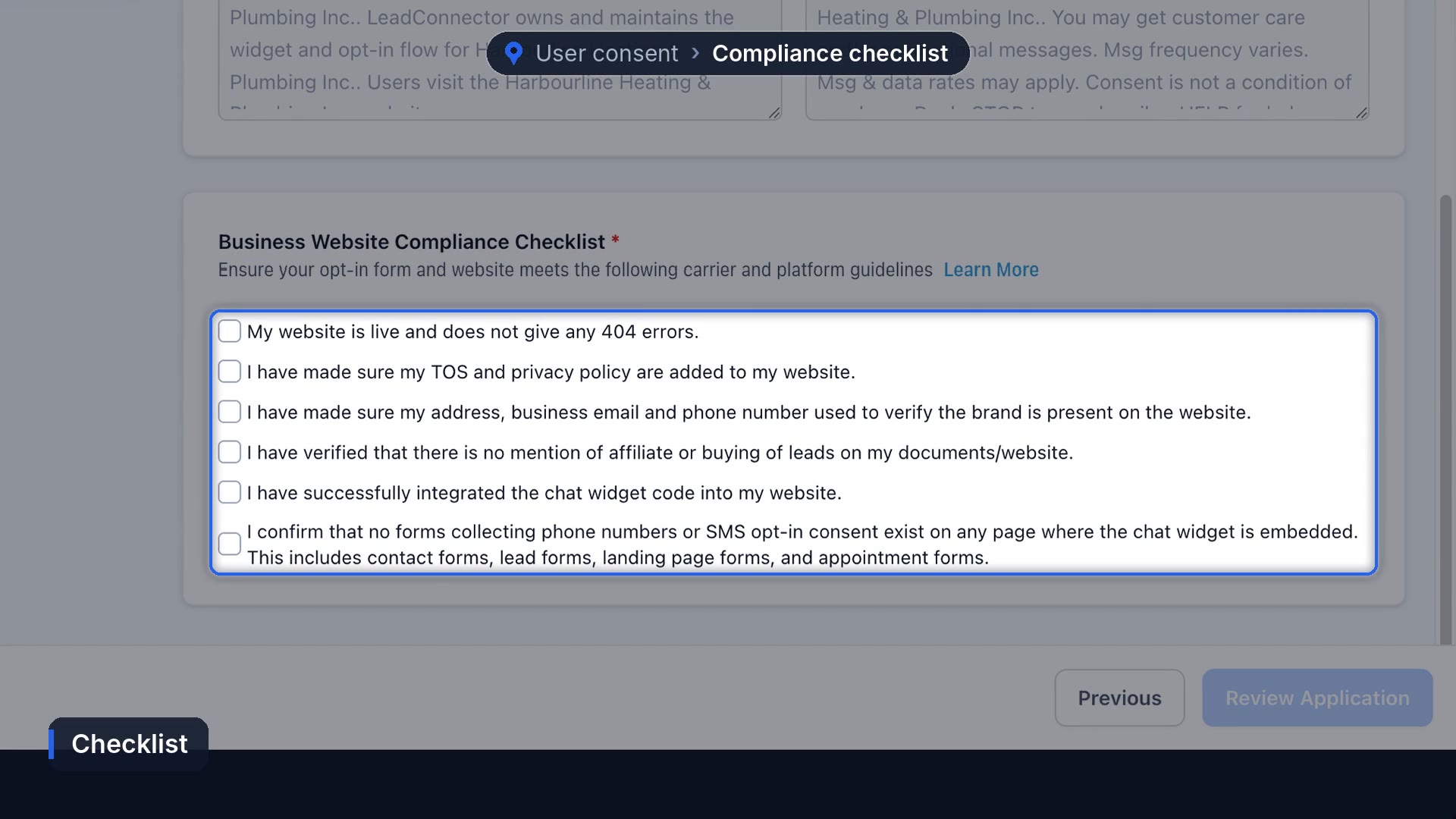
Click Review Application, then submit.
How long does A2P approval take?
After you submit, it's in the carriers' hands, and HighLevel has no say in the decision. Check progress any time in Trust Center. Once it's approved, go to Phone Numbers and make sure each number shows as A2P verified. HighLevel's docs say to link any number that doesn't to the approved campaign.
Why do A2P registrations get rejected?
The same three things, over and over:
- A legal name that doesn't match the tax documents.
- A website that isn't live yet, or is missing a privacy policy.
- A contact form collecting phone numbers on the same page as the chat widget.
The part nobody can speed up
Even a clean application waits on the carriers, and the wait isn't consistent. An application with nothing wrong with it can still sit for a while, and there's no button on our side or yours that moves it along. What helps is getting everything right the first time, because a rejection puts you back at the end of the line.
No number yet? Start with how to get a business phone number in GoHighLevel. Once you're approved, the first texts worth turning on are missed call text back and appointment reminders.
Frequently asked questions
Why are my GoHighLevel texts failing?
Most often the number isn't registered for A2P yet. Open the failed message and click view details for the reason, then check Trust Center.
Do Canadian businesses need A2P registration?
If you text US numbers, yes. For Canada only texting, numbers bought on or after March 26, 2025 need A2P or Persona verification. Older numbers don't.
What business number do I use in Canada?
The nine digit business number (BN) from the Canada Revenue Agency.
Can I use a Gmail address for A2P?
You can, but an email at your own business domain tends to get approved with less back and forth.
Funl is built on HighLevel. Links to HighLevel are referral links, so we may earn a commission if you sign up.