
Emails that land in spam are emails nobody reads. That includes the appointment reminder, the estimate and the invoice you're waiting to get paid on.
Quick answer: To set up a GoHighLevel email sending domain, go to Settings, Email Services, add a dedicated domain using a subdomain like mg.yourbusiness.com, copy the DNS records it gives you (SPF, DKIM, MX, a tracking CNAME and DMARC) into wherever your domain is managed, then click Verify. Once it's verified, send from handles like service@ and billing@ on your own domain, choose which domain sends each type of email under Domain Configuration, and warm the new domain up slowly.
Why do GoHighLevel emails go to spam?
Every account can send email from day one. By default it goes through the built in LeadConnector email system on a shared domain. That works out of the box, but you're borrowing everyone else's reputation. If other senders on that domain send junk, inbox providers notice, and some of your emails end up in spam with theirs.
The Email Services page says as much. There's a warning on the right about the shared domain, and Funl pops up a reminder suggesting a dedicated domain. The pitch is three things: better delivery, your own brand on every email, and control over the records that prove the email really came from you.
There's one more reason in HighLevel's dedicated domain guide. On shared domains, newer accounts can have their From address rewritten onto a shared mail domain, and recipients see the rewritten address. Your own sending domain avoids that.
How do you add a dedicated sending domain?
- Go to Settings, then Email Services.
- Open the dedicated domain option (it shows as Dedicated Domain And IP) and choose to create a dedicated domain.
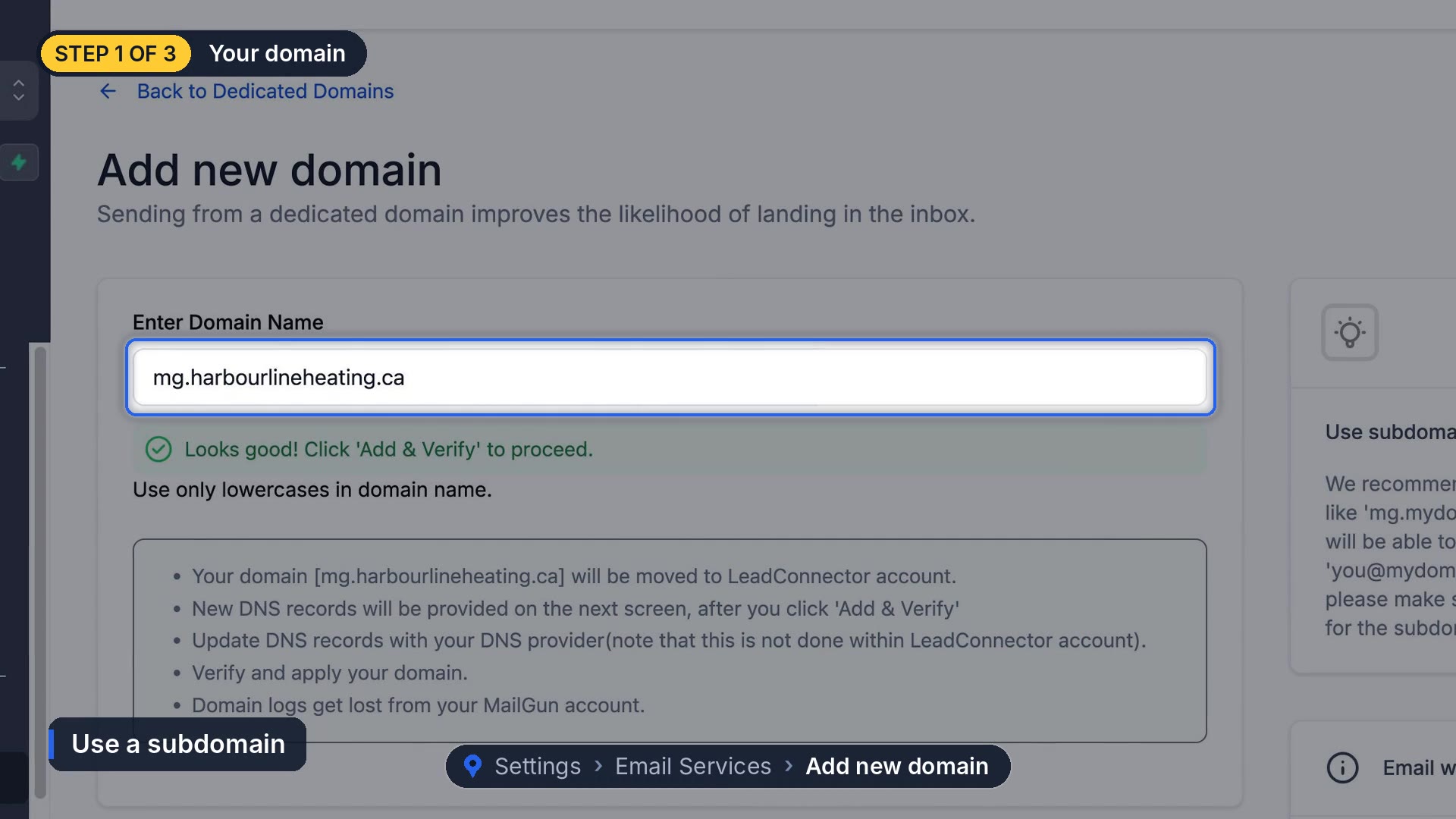
- Type a subdomain of your website. In the video we used
mg.harbourlineheating.cafor our demo account. The tip on the screen explains why: a subdomain protects your main domain while the new one builds a sending reputation. - Click Add & Verify.
Your website domain and your sending domain are separate setups. If you haven't connected your site yet, here's how to connect a domain to GoHighLevel.
Which DNS records do you need?
After you add the domain, Funl gives you a short list of DNS records. Copy each one into wherever your domain is managed, like GoDaddy or Cloudflare.
- SPF says who may send email for you.
- DKIM signs every email.
- MX receives bounces and replies.
- CNAME handles open and click tracking.
- DMARC tells inboxes what to do with fakes.
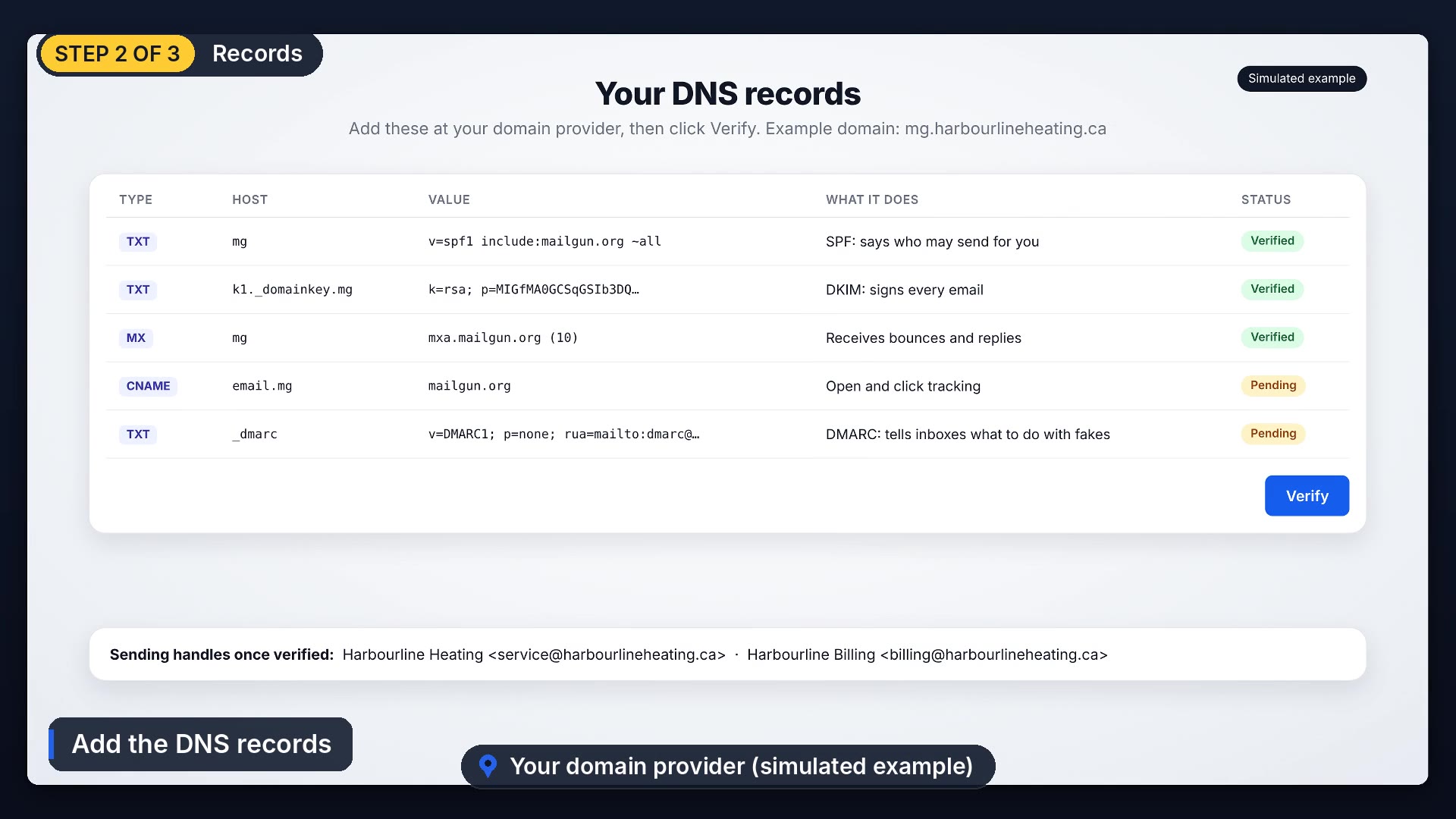
Once they're added, click Verify. HighLevel's guide says DNS changes can take up to 24 hours to spread. It also says multiple DKIM records for the same domain aren't supported, and if you get a "Domain already pointing to email server!" error, old MX or SPF records on that subdomain have to come off first.
What should you do once the domain is verified?
Send from handles on your own domain. In the video that's service@harbourlineheating.ca for bookings and billing@ for invoices. Customers see your business name in the From line instead of a generic address.
Then warm it up. For the first few weeks, send to the customers who open your emails most and keep the volume low. Inbox providers learn to trust a domain by watching how people react to it. A cold blast to thousands of people on day one is the fastest way back to spam.
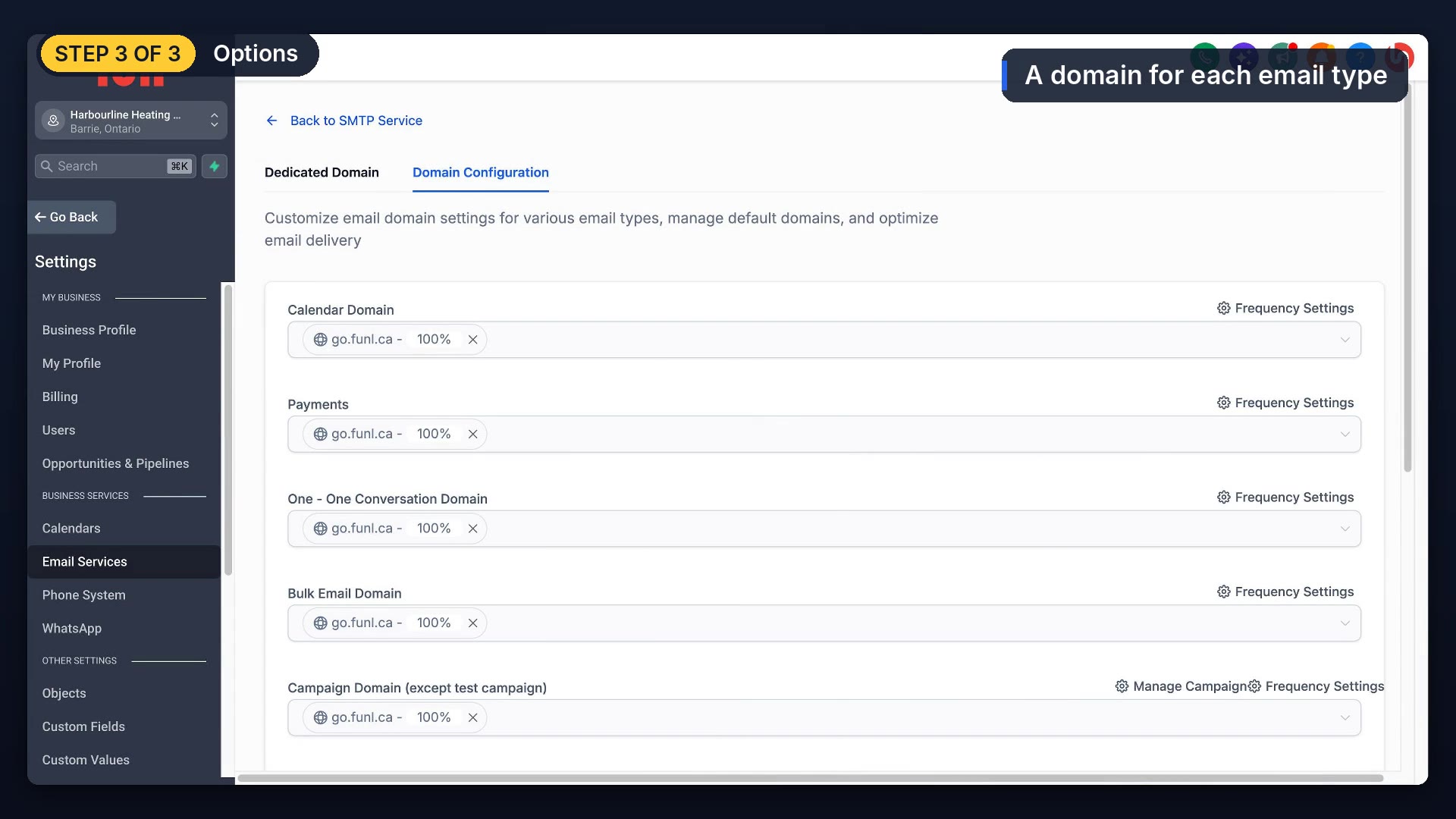
Under Domain Configuration you choose which domain sends each type of email: calendar reminders, payments, one on one conversations, bulk email and campaigns can each use their own domain.
Reminders are the emails customers most need to see. Our guide to GoHighLevel appointment reminders covers what to send and when.
Can you use Gmail or SendGrid instead?
Yes. On the Email Services page, click Add Service. You can connect Gmail, Yahoo, SendGrid or any other SMTP provider. For Other, you enter the provider's SMTP server, port, username and the email address you send from. Your provider gives you those details.
Keep in mind that the dedicated sending domain setup above only applies to accounts on the built in LC Email system. If you switch to your own SMTP provider, deliverability and DNS are handled on that provider's side.
Where do customer replies go?
Last stop is Reply & Forward Settings. Add a forwarding address so customer replies also land in your own inbox, copy a manager on every email with BCC, or set a separate reply to address.
Where this setup falls short
We couldn't show a real verification in the video, because the Harbourline demo account doesn't own its domain. The DNS screen is a labeled example of what you'll see, and the record values in your account will be different.
The other gap is warm up. HighLevel says to warm up a brand new domain before emailing large lists, but its guide doesn't give a schedule, and we don't have a number of emails per day we'd stand behind. Start with your most engaged customers, watch your open rates, and grow slowly. If opens drop, slow down.
Frequently asked questions
Should I use my main domain or a subdomain for sending?
A subdomain, like mg.yourbusiness.com. It keeps your main domain's reputation separate while the new one builds trust.
How long does GoHighLevel domain verification take?
HighLevel says DNS changes can take up to 24 hours. If it's still failing after that, double check the records at your domain provider.
Can different emails use different sending domains?
Yes. Domain Configuration lets calendar reminders, payments, one on one conversations, bulk email and campaigns each use their own domain.
Can I send GoHighLevel emails through Gmail?
Yes. Click Add Service on the Email Services page and connect Gmail, Yahoo, SendGrid or another SMTP provider.
Funl is built on HighLevel. Links to HighLevel are referral links, so we may earn a commission if you sign up.