
Your booking link says something like a long generic web address, and the customer you just texted has never heard of it. That's usually the moment people go looking for how to connect their own domain.
Quick answer: There are two different domains to connect in GoHighLevel. For your website or funnels, go to Settings > Domains & URL Redirects > Connect a domain > Funnel/Website/Store/Blog/Webinar, enter the domain and follow the DNS steps. For the links your account sends out (booking, review, payment and form links), go to Settings > Business Profile > Branded Domain, enter a subdomain like app.yourbusiness.com, point a CNAME record at brand.ludicrous.cloud and click Add Domain.
Which domain do you need to connect?
It depends on what you want people to see.
- A website or funnel domain puts your pages on your own address, like yourbusiness.com or book.yourbusiness.com.
- A branded domain changes the links your account sends automatically. Per HighLevel's branded links guide, that covers forms, surveys, calendar links, trigger links, payment links and review links.
Most businesses want both. They're set up in different places and point at different targets, so do them one at a time.
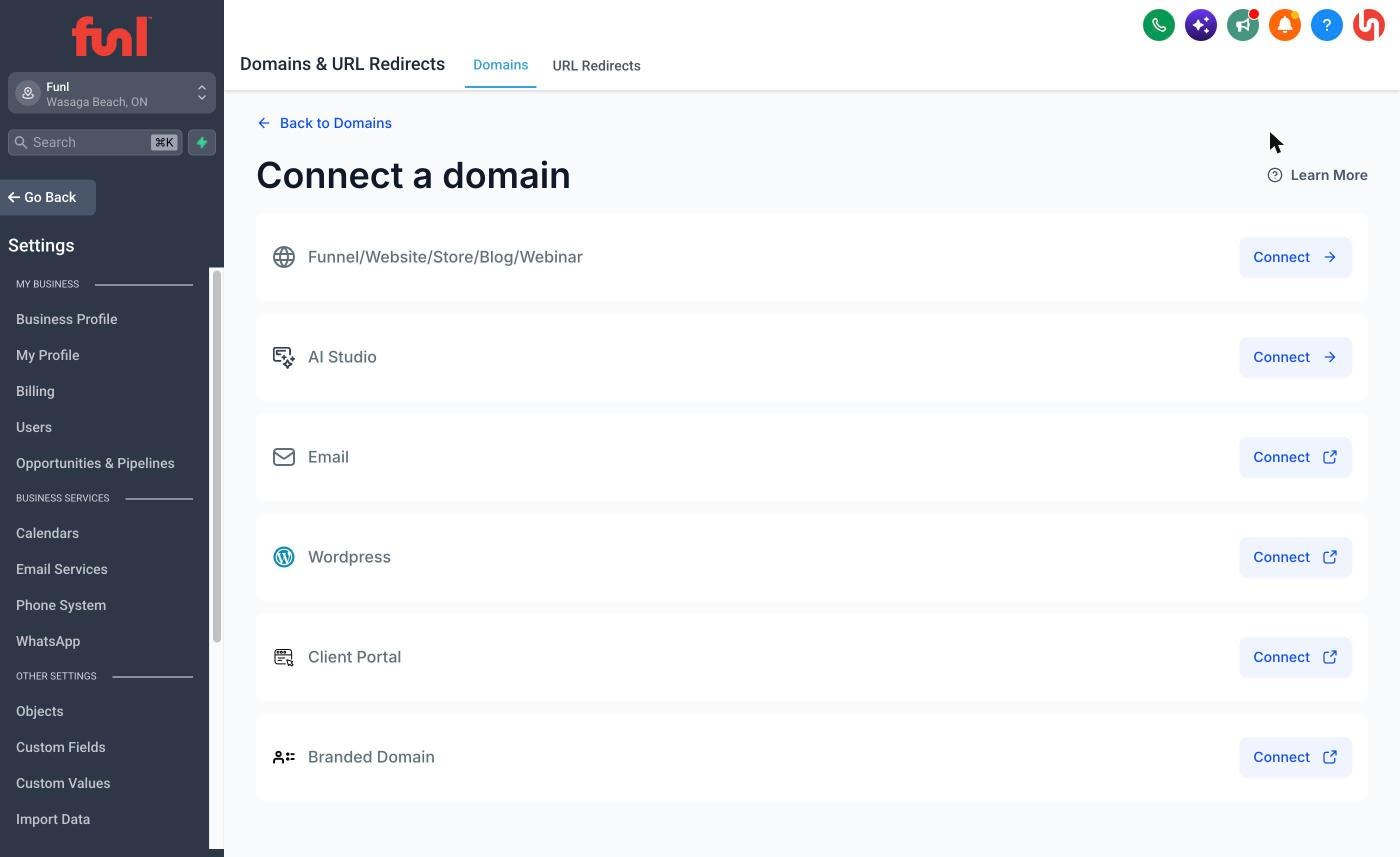
When you click Connect a domain, the screen lists every type: Funnel/Website/Store/Blog/Webinar, AI Studio, Email, Wordpress, Client Portal and Branded Domain.
Should you use your root domain or a subdomain?
If yourbusiness.com already runs a website or email somewhere else, use a subdomain. HighLevel's domain types guide warns that connecting a root domain that's in use elsewhere can break the existing site or mailbox. Something like book.yourbusiness.com or go.yourbusiness.com keeps your current site untouched.
Use the root domain only when GoHighLevel will host your main website.
For the branded domain, always use a subdomain. The same guide says a root domain there will point your domain away from your website.
How do you connect a domain to a GoHighLevel website or funnel?
- Go to Settings > Domains & URL Redirects and click Connect a domain.
- Click Connect on the Funnel/Website/Store/Blog/Webinar row.
- Type your domain or subdomain in the Domain field and click Continue.
- If your provider supports automatic setup (Domain Connect), HighLevel can add the DNS records for you. Its guide names Google, Cloudflare and GoDaddy. For any other provider, choose to add the records manually.
- For manual setup, go to your domain provider's DNS settings and add the record the screen gives you. Per HighLevel's root domain and subdomain guide, a subdomain uses a CNAME pointing to sites.ludicrous.cloud, and a root domain uses an A record with host @. Copy the exact value from your own screen rather than from any article, this one included.
- Back in GoHighLevel, pick the website or funnel the domain should open, choose its default page, and click Link Domain.
Don't create both an A record and a CNAME for the same hostname. If your DNS is on Cloudflare, set the record to DNS only, not Proxied.
If you connect a root domain, HighLevel can add the www version and redirect it to the root, so both addresses work.
Building the site itself is its own job. Here's how to build your first funnel, and a walkthrough of building a website with AI in AI Studio.
How do you set up a branded domain for your links?
This is the one from the video above, at 1:01.
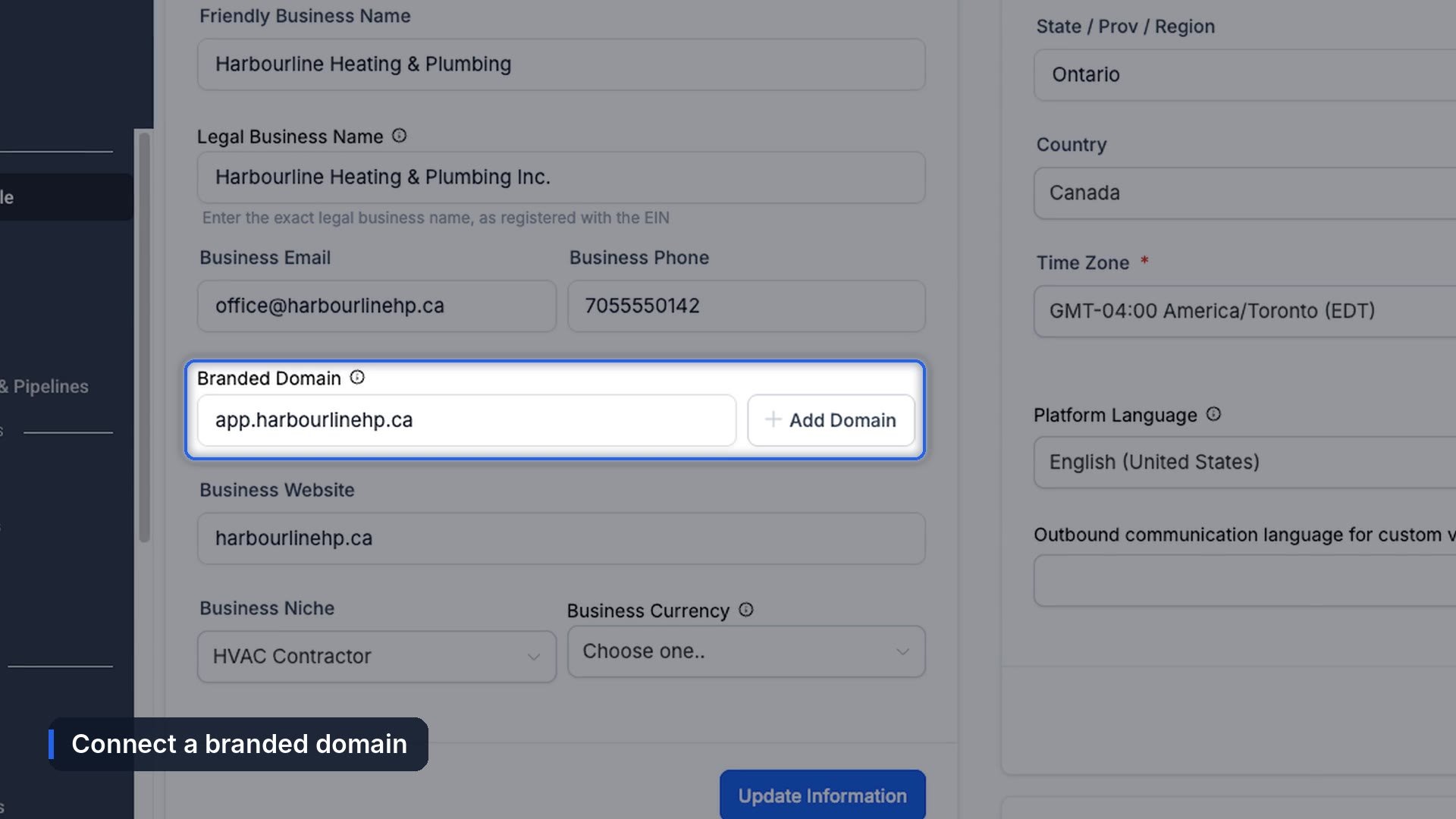
- Go to Settings > Business Profile.
- Find the Branded Domain field and type a subdomain of your website, like app.yourbusiness.com.
- At your domain provider, add a CNAME record for that subdomain pointing to brand.ludicrous.cloud. Hover the info icon next to Branded Domain to see the target.
- Click Add Domain, then Update Information at the bottom of the page.
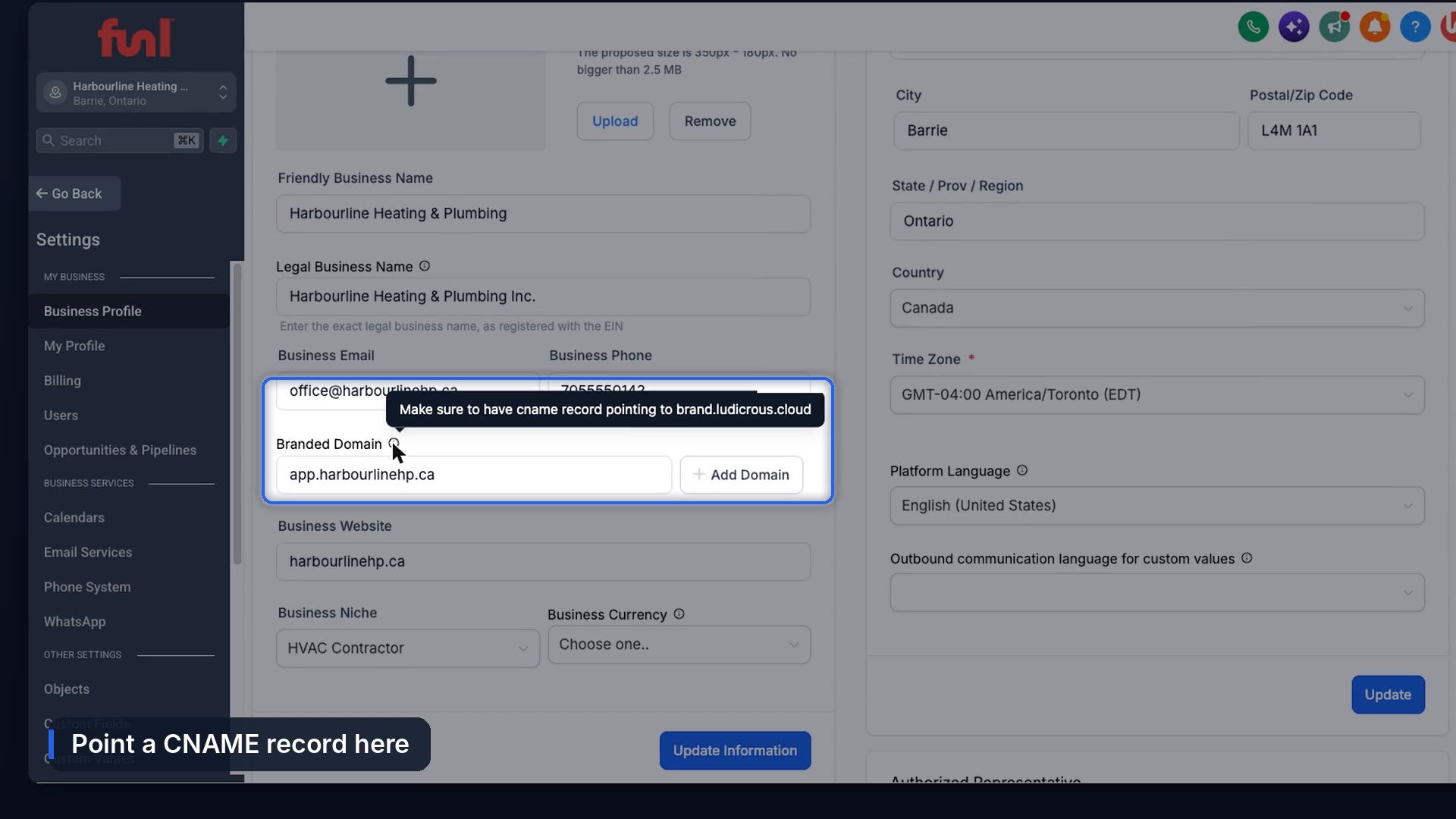
Once it's connected, booking and review links show your domain instead of a generic one. Customers trust a link they recognize.
Setting up the rest of the account? The GoHighLevel tutorial for beginners covers the other five day-one jobs. Your email sending domain is a separate setup again, with its own records, covered in our guide to setting up a GoHighLevel email sending domain.
How long does it take, and what can go wrong?
HighLevel's guides don't agree on timing. The website domain guide says DNS changes can take up to 24 hours. The branded links guide says up to 48 hours, though often sooner. SSL is added automatically once the domain connects and usually takes a few minutes.
What we can't tell you is which of those you'll get. It depends mostly on your domain provider. If a domain still isn't working after a day, check these first:
- The record type matches (CNAME for a subdomain, A record for a root).
- There isn't an old record for the same hostname still sitting there.
- Cloudflare proxy is off for that record.
- The host field holds only the subdomain part, like "app", not the full address. Some providers add your domain on automatically.
Frequently asked questions
What is a branded domain in GoHighLevel?
A subdomain of your own website that replaces the generic address in links your account sends, like booking, review, form and payment links. You set it in Settings > Business Profile.
What CNAME do I use for a GoHighLevel website?
HighLevel's guide gives sites.ludicrous.cloud for a subdomain. The branded domain uses brand.ludicrous.cloud. Always confirm against what your own account shows.
Can I connect more than one domain to one account?
Yes. HighLevel's guide doesn't list a limit, and several funnels or websites can share one domain.
Will connecting my domain break my email?
Not if you use a subdomain. Connecting a root domain that already runs email or a website elsewhere can cause problems, which is why a subdomain is the safer choice.
Funl is built on HighLevel. Links to HighLevel are referral links, so we may earn a commission if you sign up.